Cupcake Calendar: Unlocking the Potential of This Adorable Handwriting Font
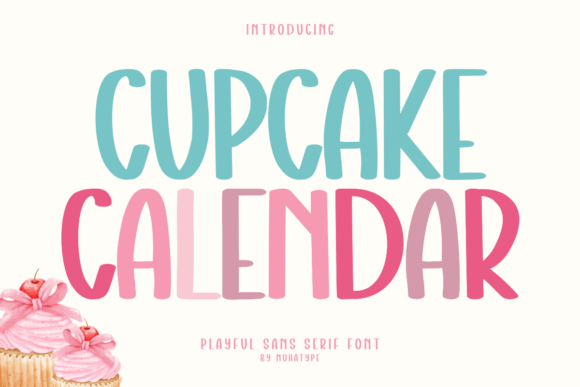
Finding the perfect font for your next project often feels like a search for a missing puzzle piece. You need something that speaks a certain language—perhaps one of warmth, friendliness, and approachability. This is precisely where Cupcake Calendar enters the conversation. It is a cute sans serif handwriting font designed with a soft, friendly, and natural look. While it is easy to fall in love with its aesthetic at first glance, truly harnessing its power requires a deeper understanding of its design and application. Many creators download a font, use it once, and move on, missing the opportunity to elevate their work significantly.
The appeal of Cupcake Calendar lies in its ability to bring a warm, handcrafted feeling to digital and physical products. It works beautifully for a wide array of applications, including craft projects, planners, stickers, kids worksheets, classroom printables, and DIY designs. However, the difference between a mediocre project and a professional-looking one often comes down to how well you understand the specific characteristics of the font you are using. Let us explore the common pitfalls people encounter with handwriting fonts and how you can make better choices to ensure your designs always hit the mark.
Understanding the Anatomy of Cupcake Calendar
Before diving into design, it is helpful to understand what makes this font tick. The description of simple strokes and smooth curves is not just marketing copy; it has technical implications. Because the strokes are not overly complex, Cupcake Calendar is exceptionally easy to cut using Cricut and Silhouette machines. This is a critical detail for crafting moms and small business owners who create physical products like decals or heat transfers.
A common misunderstanding is that all handwriting fonts behave the same way in cutting software. In reality, fonts with excessive swashes, ligatures, or thin, overlapping lines can cause cutting machines to snag, tear material, or produce jagged edges. By choosing a font engineered with smooth curves, you are preemptively solving a workflow problem. You spend less time weeding and troubleshooting, and more time creating.
The Legibility Trap in Long-form Text
One of the most frequent mistakes I see creators make is using a handwriting font like Cupcake Calendar for large blocks of body text. While it is tempting to give an entire recipe card or journal entry a hand-written feel, readability can suffer. Handwriting fonts are designed for display, headers, and short bursts of text. When used for paragraphs, the eye tires quickly because the brain has to work harder to decipher the varying letterforms.
The Better Approach: Use Cupcake Calendar for headlines, subheadings, and short quotes. For the body text—such as the instructions on a worksheet or the details on a greeting card—pair it with a clean, legible sans serif or a simple serif font. This contrast creates a visual hierarchy that guides the reader's eye naturally. For instance, a header reading "Weekly Meal Plan" in Cupcake Calendar looks inviting, while the grocery list below it in a standard font remains functional.
Spacing and Kerning Misconceptions
Another area where users often struggle is spacing. Handwriting fonts sometimes have default letter spacing that looks perfect in a design program but appears too crowded or too wide on a final product. This is especially true when resizing for stickers or bullet journal headers.
Do not assume the default settings are perfect for every project. A crucial step before finalizing any design is to adjust the tracking (overall spacing) and kerning (space between specific pairs of letters). For example, if you are typing the word "Hello," the space between the "H" and "e" might need a slight manual adjustment to look natural. Ignoring this can make your text look disjointed or amateurish, undermining the very handcrafted quality you are trying to achieve.
Matching Tone with Project Type
Just because a font is cute does not mean it is appropriate for every context. Cupcake Calendar excels in environments meant to feel playful and approachable. It is perfect for kids labels, coloring pages, worksheets, bullet journals, scrapbooks, and playful graphic projects.
However, using it for a formal business proposal, a high-end luxury brand, or a serious medical document would be a mismatch. The soft, friendly nature of the font communicates informality. Before you select it, ask yourself: "Does my project need to convey authority and seriousness, or warmth and creativity?" If the answer is the latter, you are in the right territory. This conscious evaluation prevents the jarring experience of a font that clashes with the message.
Color and Contrast Considerations
A subtle mistake that affects the final presentation is overlooking color contrast. Because Cupcake Calendar features simple strokes, it can sometimes appear thinner than bold, blocky fonts. If you place light-colored text on a light background, or use a low-contrast color palette, the text might disappear, especially when printed.
Always test your color choices. If you are designing a sticker with a pastel background, ensure the text color is dark enough to stand out. Alternatively, if you are using a Cricut to cut the text out of vinyl, remember that very thin strokes might be difficult to weed if the vinyl is not high quality. In such cases, slightly bolding the text or choosing a darker material can save you a lot of frustration.
Practical Advice for Seamless Integration
To get the most out of Cupcake Calendar, integrate it thoughtfully into your workflow. Here are a few actionable tips to ensure high-quality results:
- Test at Final Size: Always view your design at the actual size it will be printed or displayed. Text that looks great on a large monitor might become illegible on a small planner sticker.
- Layering Techniques: When creating scrapbook elements, try layering the font over subtle textures. The soft curves of the font pair well with watercolor backgrounds or kraft paper textures, enhancing the handcrafted aesthetic.
- File Format Awareness: If you are sending files to a print shop or sharing them with a client, ensure you outline your fonts or provide the necessary font files. This prevents the "missing font" error that can ruin a print run.
- Explore Alternatives for Variety: While Cupcake Calendar is a fantastic choice, having a small library of complementary fonts allows you to create more dynamic designs. Look for other fonts that share a similar x-height or stroke weight to maintain visual consistency across a project series.
Final Thoughts on Quality and Satisfaction
Choosing a font is more than just an aesthetic decision; it is a functional one. Cupcake Calendar offers a specific blend of charm and utility that is hard to find. It bridges the gap between the desire for a personal, handwritten touch and the need for digital precision. By avoiding common mistakes—such as poor legibility choices, neglecting spacing, and ignoring context—you ensure that your projects not only look good but also communicate effectively.
Whether you are a small business owner designing product labels, a teacher creating engaging classroom materials, or a hobbyist adding flair to a scrapbook, the right font sets the foundation for success. Take the time to explore the features of Cupcake Calendar, apply these practical corrections, and watch your designs transform from simple text into meaningful visual communication.