Damble: A Designer's Guide to Using This Bold Brush Font Effectively
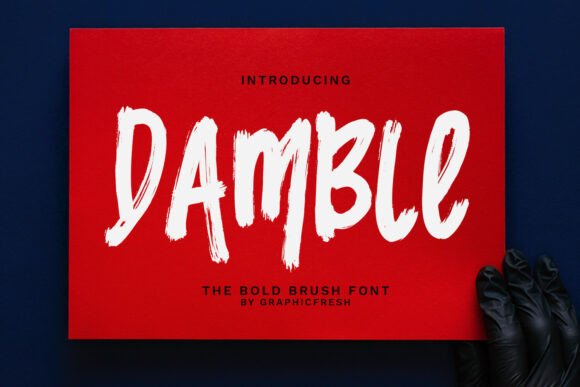
When your design project demands immediate attention, the typography you select becomes your loudest voice. Damble, a bold brush font with powerful strokes and expressive texture, is designed specifically for this purpose. It’s a typeface that doesn’t just sit on the page; it leaps off it, bringing a raw, hand-painted energy that can transform a simple message into a compelling statement. Its rugged edges and dynamic movement deliver the confidence and visual impact needed to stand out in crowded marketplaces, from social media feeds to product packaging.
However, the very qualities that make Damble so powerful—its boldness, texture, and energy—also make it a tool that requires careful consideration. Using it effectively is about more than just liking its style. It’s about understanding its strengths and, more importantly, its potential pitfalls. Many designers, especially those new to expressive typography, make avoidable mistakes that undermine their work's professionalism and clarity. Let’s explore how to harness Damble’s energy without sacrificing effectiveness.
The Allure and the Oversight: Why Damble Catches Eyes (and Can Trap Them)
The appeal of a font like Damble is immediate. It offers a shortcut to a specific aesthetic: gritty, authentic, energetic, and handmade. For a fitness brand logo, a music festival poster, or a bold social media graphic, it can seem like the perfect one-click solution. This is where the first major misunderstanding occurs. Damble is not a universal workhorse font. Its strength is its specialization. Treating it as a go-to for all headings or, worse, for body text, is a common error that leads to visual fatigue and compromised readability. A wall of textured, brush-stroke letters is exhausting to read. Its power lies in strategic, impactful doses.
Think of Damble like a potent spice. A dash can elevate a dish, but dumping the whole jar in ruins it. Its purpose is to create a focal point, to inject a shot of adrenaline into a design, not to narrate the entire story. Overusing it is the fastest way to turn a dynamic design into a chaotic, unprofessional mess.
Practical Pitfall: Ignoring Context and Contrast
A frequent mistake is pairing Damble with another highly decorative or similarly bold font. This creates visual competition where nothing wins. The result is a cluttered, confusing layout where the viewer’s eye has nowhere to rest. The rugged, organic texture of Damble demands a clean, stable partner. Without strong contrast, the design loses hierarchy and clarity.
A better approach: Always pair expressive fonts like Damble with a simple, highly legible sans-serif or a classic serif. For example, use Damble for a main headline to grab attention, then set your subheadings and body copy in a font like Open Sans, Lato, or Georgia. This creates a clear visual hierarchy. The bold brush font makes its statement, and the complementary font provides calm, readable support, guiding the viewer through the information effortlessly.
Beyond the Surface: Technical and Usability Checks You Can't Skip
Before you commit to Damble for a project, especially one that will be printed or scaled to different sizes, you must look beyond the preview. What looks great as a 200-pixel thumbnail can reveal problems at full size.
Check the actual letterforms. Download a test version or use the preview tool to type out your exact headline. Pay close attention to how individual characters connect, especially in lowercase. Some brush fonts have awkward joins or letters that blend into each other in an unreadable way. Test combinations like "be," "do," or "fi" to ensure they form clear, distinct shapes.
Evaluate readability at small sizes. If you plan to use Damble for a button or a small call-to-action, zoom out. The very texture and detail that give it character can become visual noise at small scales, making the text illegible. A good rule of thumb: if you have to squint to read it, your audience will too, and they’ll simply move on.
Consider licensing and usage. This is a critical, often overlooked step. Font licenses vary dramatically. Is it free for personal use only? Does a commercial license cover web embedding, app usage, and print-on-demand products? Using a font outside its license terms is a legal and financial risk. Always verify the license before finalizing your design, especially for client work or products you intend to sell.
Mastering the Mood: Ensuring Damble Serves Your Message
Every typeface carries an inherent mood. Damble’s mood is bold, confident, and slightly rebellious. This is perfect for brands and projects that want to convey strength, creativity, or a handcrafted feel. However, it’s entirely wrong for contexts requiring neutrality, subtlety, or traditional authority.
Using Damble for a law firm’s website, a formal wedding invitation, or a medical brochure would be a severe mismatch. It would communicate the wrong values, potentially eroding trust and confusing the audience. The font should amplify your message, not contradict it. Before selecting it, ask: Does the personality of this font align with the core identity of my project or brand?
Realistic example: A craft brewery’s logo using Damble works because it suggests artisanal, hands-on production. The same font for a financial consulting firm’s main heading would feel unprofessional and unstable, undermining the very sense of security the firm needs to project.
Actionable Advice for Better Outcomes
To use Damble successfully, integrate it into your workflow thoughtfully, not impulsively.
- Start with a clear hierarchy. Plan your typographic scale before you even pick a font. Decide which elements need the most emphasis. Reserve Damble for one, perhaps two, high-impact elements like a main headline or a logo.
- Test in grayscale. This old design trick helps you see pure contrast and form without the distraction of color. If your Damble headline isn’t readable and distinct in grayscale, the color version won’t save it.
- Adjust tracking and leading. Bold, textured fonts often benefit from slightly increased letter-spacing (tracking) and line spacing (leading). This extra breathing room improves readability and lets the font’s details shine without feeling cramped.
- Use it for key words, not sentences. Sometimes the most powerful use is to highlight a single, crucial word in a headline with Damble, setting the rest of the phrase in a simpler font. This draws the eye precisely where you want it.
In the end, Damble is a specialist. It’s a brush in your toolkit, not the entire toolkit. When used with intention, an understanding of its character, and a respect for readability, it can elevate your design from ordinary to unforgettable. The goal isn’t just to use a bold font, but to communicate a bold message with clarity and impact. By avoiding these common mistakes and applying these practical checks, you ensure that Damble works for you, delivering the striking presence it promises without compromising your project’s success.